
Getting Started#
Objective#
The objective of OOS Studio is to deliver an intuitive digital web application, and complementary methodology and a set of open-source functions for the anonymisation and analysis of Out-of-Straightness (OOS) data from subsea pipelines. The framework ensures that OOS data can be processed in a way that removes project-specific or identifying characteristics, enabling the secure sharing and aggregation of data across organisations. By standardising how OOS data is anonymised and structured, OOS Studio facilitates the creation of consistent databases, allowing companies to build high-quality datasets that can inform and improve the design of future developments.
The anonymisation component of OOS Studio has been released as an open-source Python module of PySubsea, distributed via PyPI, to support transparency, industry adoption, and collaboration. Users can perform anonymisation directly through the web application or integrate the open-source library into their own data handling processes, contributing to a shared, standardised approach. When using the web app, the anonymisation process is designed to be secure and privacy-preserving, with no input or output data stored on the server, ensuring that all data remains entirely under the user’s control.
Once the OOS data has been anonymised, users will be able to perform statistical assessments through the web application, which includes a suite of built-in tools designed to simplify the analysis process. These tools rely on the supporting open-source Python library that provides the core functions for deriving the probability distributions of the so-called HOOS X Factors, key input parameters used to quantify the probabilistic lateral buckling response of pipelines. By separating the calculation logic into an open-source library, OOS Studio enables broader reuse, transparency, and independent verification, while offering a streamlined and accessible interface through the web app.
The web application will be accessible online, providing users with a user-friendly interface for running anonymisation workflows and statistical analyses without requiring local installation. By providing a common, repeatable framework for both anonymisation and statistical characterisation, OOS Studio supports the development of more consistent, data-driven design methodologies across the pipeline engineering community.
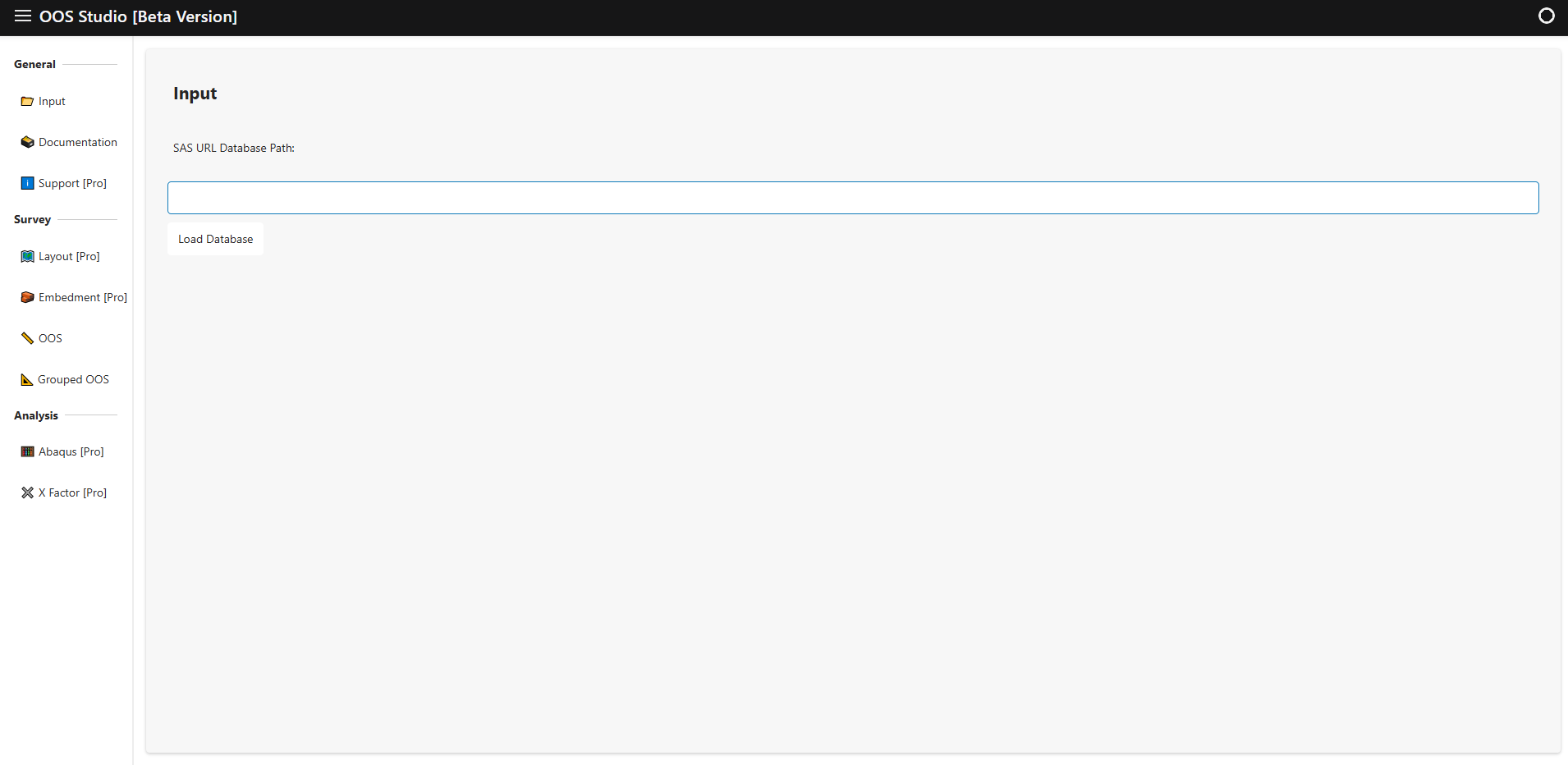
This figure presents a general view of the OOS Studio landing page.
OOS Anonymisation Methodology#
General#
The anonymisation component of OOS Studio processes data by reading two primary tables:
The first table contains the survey data capturing the measured Out-of-Straightness profiles.
The second table holds the route layout design data, which defines the planned pipeline alignment.
Using this information, the anonymisation workflow first separates the data into nominally straight sections and route curve sections. These sections are then concatenated and joined such that their connecting ends share the same slope, producing a continuous and smoothly aligned representation of the pipeline geometry. Following concatenation, the combined sections are translated to the origin and rotated so that the start and end points align horizontally.
As part of this process, pipeline segments located near critical features—such as In-Line Tees (ILT), Pipeline Walking Mitigation Devices (PWMD), and Lateral Buckling Mitigation Devices (LBMD), are excluded. Typically, segments within approximately 200 meters on either side of these features are removed to safeguard sensitive operational details. Both the translation to a normalized coordinate system and the selective removal of sensitive sections enhance data privacy while maintaining the usefulness and integrity of the anonymised OOS profiles.
Once the data has been anonymised, it can be smoothly processed using Gaussian and FFT filters. Details of these filters are presented in the PySubsea website.
Note:
To preserve confidentiality, any variables that could disclose the identity or specific details of a pipeline project—such as Development, Survey Type, Pipeline Group, Pipeline Name, or similar descriptors—can be anonymised prior to processing. These fields are used for reference only and do not need to reflect actual project names. Users are encouraged to substitute identifying labels with neutral or generic terms to ensure that the dataset remains anonymous while retaining its structural integrity for analysis and aggregation.
Input Layout Data for OOS Anonymisation#
The table below lists the layout data to perform the OOS assessment. Each row represents a segment of the pipeline route, including its geometry, identification, and classification details.
- Notes:
KP From and KP To are specified in meters (m), not kilometers.
For section types LBMD (Lateral Buckling Mitigation Device), PWMD (Pipeline Walking Mitigation Device), and ILT (In-Line Tee), the values for Point ID From, Point ID To, KP From, and KP To must be the same, as these features are represented as single points along the pipeline.
Table Name |
Description |
|---|---|
Development |
Development for the pipeline. |
Pipeline Group |
Group identifier for the pipeline. |
Pipeline |
Pipeline name or ID. |
Point ID From |
Identifier for the starting point of the layout section. Note: For LBMD, PWMD, and ILT, this must be the same as Point ID To. |
Point ID To |
Identifier for the ending point of the layout section. Note: For LBMD, PWMD, and ILT, this must be the same as Point ID From. |
KP From |
Start point of the layout section (km). Note: For LBMD, PWMD, and ILT, this must be the same as KP To. |
KP To |
End point of the layout section (km). Note: For LBMD, PWMD, and ILT, this must be the same as KP From. |
Pipeline Section - Type |
Type of section. Options: Straight, Curve, LBMD, PWMD, ILT. |
Route Curve Radius |
Design radius of curvature for curved sections (m). |
Input Survey Data for OOS Anonymisation#
The table below lists the survey data required to perform the pipeline OOS anonymisation.
Variable Name |
Description |
|---|---|
Development |
Development for the pipeline. |
Survey Type |
Type of the survey. Note: The survey type can be As-Laid, As-Built, or OPxxxx. - As-Laid: Survey performed after the installation of the pipeline. - As-Built: Survey performed after the hydrotest. - OPxxxx: Operational survey; xxxx denotes the year (e.g., OP2023). |
Pipeline Group |
Group identifier for the pipeline. |
Pipeline |
Pipeline name or ID. |
Date |
Date of measurement. Note: When the survey data points were observed. Format: DD/MM/YYYY, e.g. 08/11/2016. |
Time |
Time of measurement. Note: When the survey data points were observed. Format: HH:MM:SS, e.g. 08:56:30 |
KP |
Kilometer Point along the pipeline. Format: Decimal number (km), e.g. 12.345 Note: Referenced to TOP. |
DCC |
Distance from Control Center. Format: Decimal number (m), e.g. 1.234 Note: Referenced to TOP. |
Easting |
Easting coordinate. Format: Decimal number (m), e.g. 123456.7 Note: Referenced to the TOP. |
Northing |
Northing coordinate. Format: Decimal number (m), e.g. 765432.1 Note: Referenced to the TOP. |
TOP Depth |
Top of pipe depth. Format: Decimal number (m), e.g. 1020.34 Note: Calculated water depth from the vertical datum to the digitised TOP value. |
BOP Depth |
Bottom of pipe depth. Format: Decimal number (m), e.g. 1020.74 Note: Calculated water depth from the vertical datum to the digitised BOP value. |
Port Adj Depth |
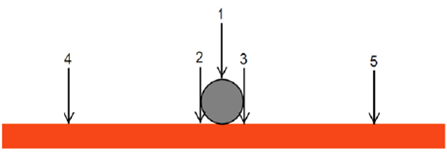
Port side adjacent depth. Format: Decimal number (m), e.g. 1020.53 Note: ADJL - adjacent seabed left (2). |
Stbd Adj Depth |
Starboard side adjacent depth. Format: Decimal number (m), e.g. 1020.55 Note: ADJR - adjacent seabed right (3). |
Mean Adj Depth |
Mean adjacent depth. Format: Decimal number (m), e.g. 1020.54 Note: MADJ - mean adjacent seabed level (average of ADJL and ADJR). |
Port Seabed Depth |
Port side seabed depth. Format: Decimal number (m), e.g. 1020.53 Note: SBL - seabed level left 3 m from TOP (4). |
Stbd Seabed Depth |
Starboard side seabed depth. Format: Decimal number (m), e.g. 1020.55 Note: SBR - seabed level right 3 m from TOP (5). |
Mean Seabed Depth |
Mean seabed depth. Format: Decimal number (m), e.g. 1020.54 Note: MSB - mean undisturbed seabed level (average of SBL and SBR). |
Embedment |
Difference between BOP and mean adjacent depth. Format: Decimal number (m), e.g. 0.200 |
Post-Processed Survey Data for OOS Anonymisation#
The following two tables present the additional post-processed outputs generated from the input survey data after applying the OOS anonymisation process.
The first table contains anonymised information on a per-pipeline basis; however, it does not preserve the spatial context or the original locations of the features. The data is further split into two categories: nominally straight sections and route curve sections of the pipelines. This division allows for differentiated analysis of these distinct pipeline geometries while maintaining the anonymisation of sensitive location details.
The second table provides anonymised information aggregated by groups of pipelines belonging to the same system. In this table, the data from each pipeline within the group are concatenated into a single continuous string. Similar to the first table, the data is separated into nominally straight and route curve sections, supporting system-level analysis with enhanced privacy by combining multiple pipelines’ information into a unified anonymised dataset.
Together, these tables offer complementary views of the anonymised data: one focusing on pipeline-level details without spatial references and separated by section type, and the other on aggregated system-level data, enabling flexible and privacy-conscious analysis of both nominally straight and curved pipeline sections.
Variable Name |
Description |
|---|---|
Development |
Development for the pipeline. |
Survey Type |
Type of the survey. Note: The survey type can be As-Laid, As-Built, or OPxxxx. - As-Laid: Survey performed after installation. - As-Built: Survey performed after hydrotest. - OPxxxx: Operational survey; xxxx denotes the year (e.g., OP2023). |
Pipeline Group |
Group identifier for the pipeline. |
Pipeline |
Pipeline name or ID. |
Pipeline Section - Type |
Type of pipeline section (i.e., Straight or Curve). Note: Indicates the geometric nature of the pipeline route at the KP. |
Pipeline Section - No |
Integer identifier for the section of the pipeline at the given KP, starting from 1. Note: Segments comprise straight and curve routing sections. |
Pipeline Section - KP Mod |
Kilometric point after splitting into sections, each section KP restarts at zero. Format: Decimal number (km), e.g. 12.145 Note: Used for analysis excluding influence zones of features. |
Pipeline Section - Easting Mod |
Easting coordinate after splitting and translation/rotation. Start of each section at origin (0,0), aligned horizontally. Format: Decimal number (m), e.g. 1001.7 Note: Referenced to pipeline route projection. |
Pipeline Section - Northing Mod |
Northing coordinate after splitting and translation/rotation. Start of each section at origin (0,0), aligned horizontally. Format: Decimal number (m), e.g. 6.1 Note: Referenced to pipeline route projection. |
Route Curve Radius |
Design radius of curvature for curved sections (m). |
Actual Route Curve Radius |
Actual, surveyed radius of curvature of the pipeline route curve (m). Format: Decimal number (m), e.g. 500.0 Note: Radius fitted by least squares method; applies only to curve sections. |
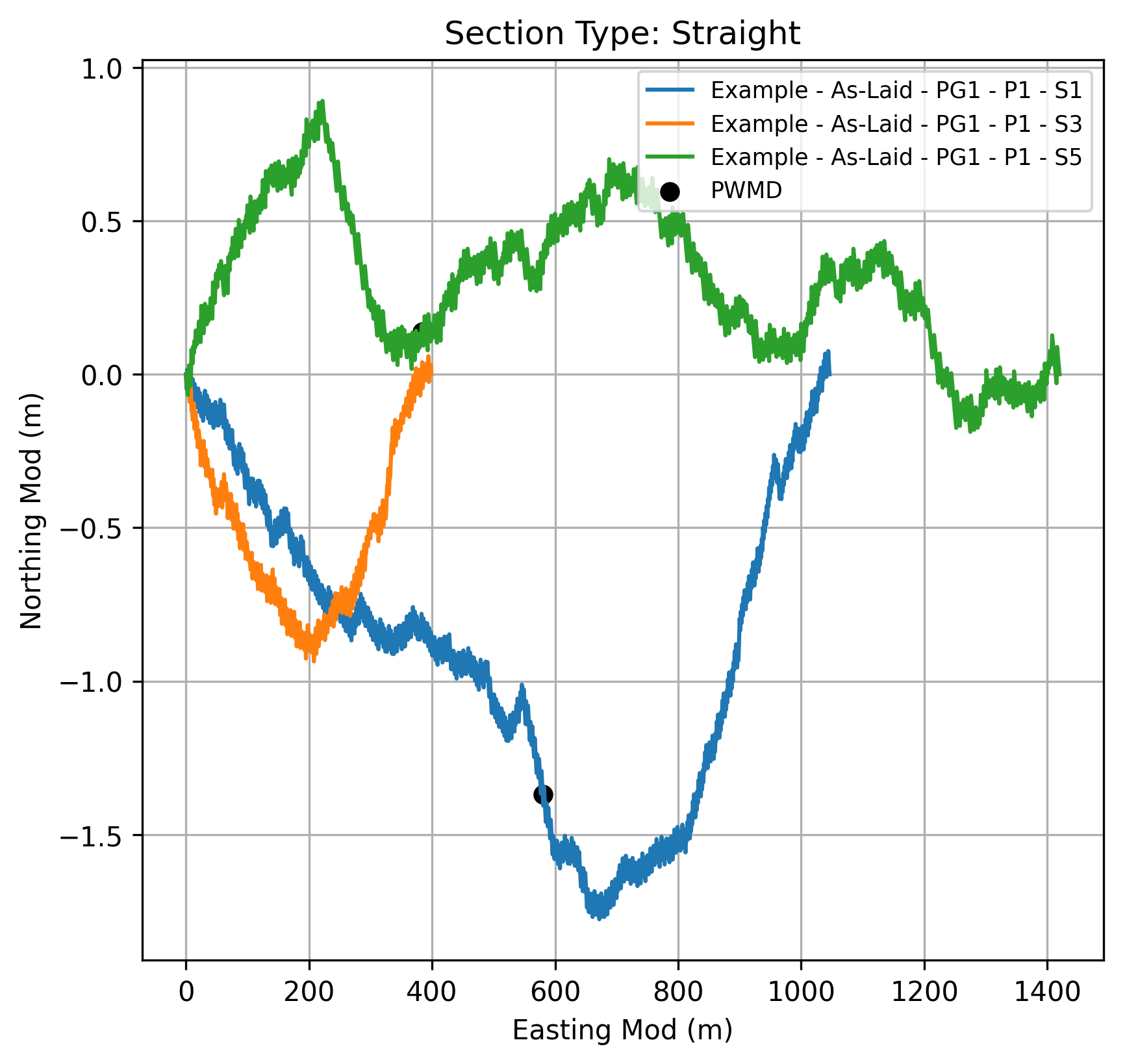
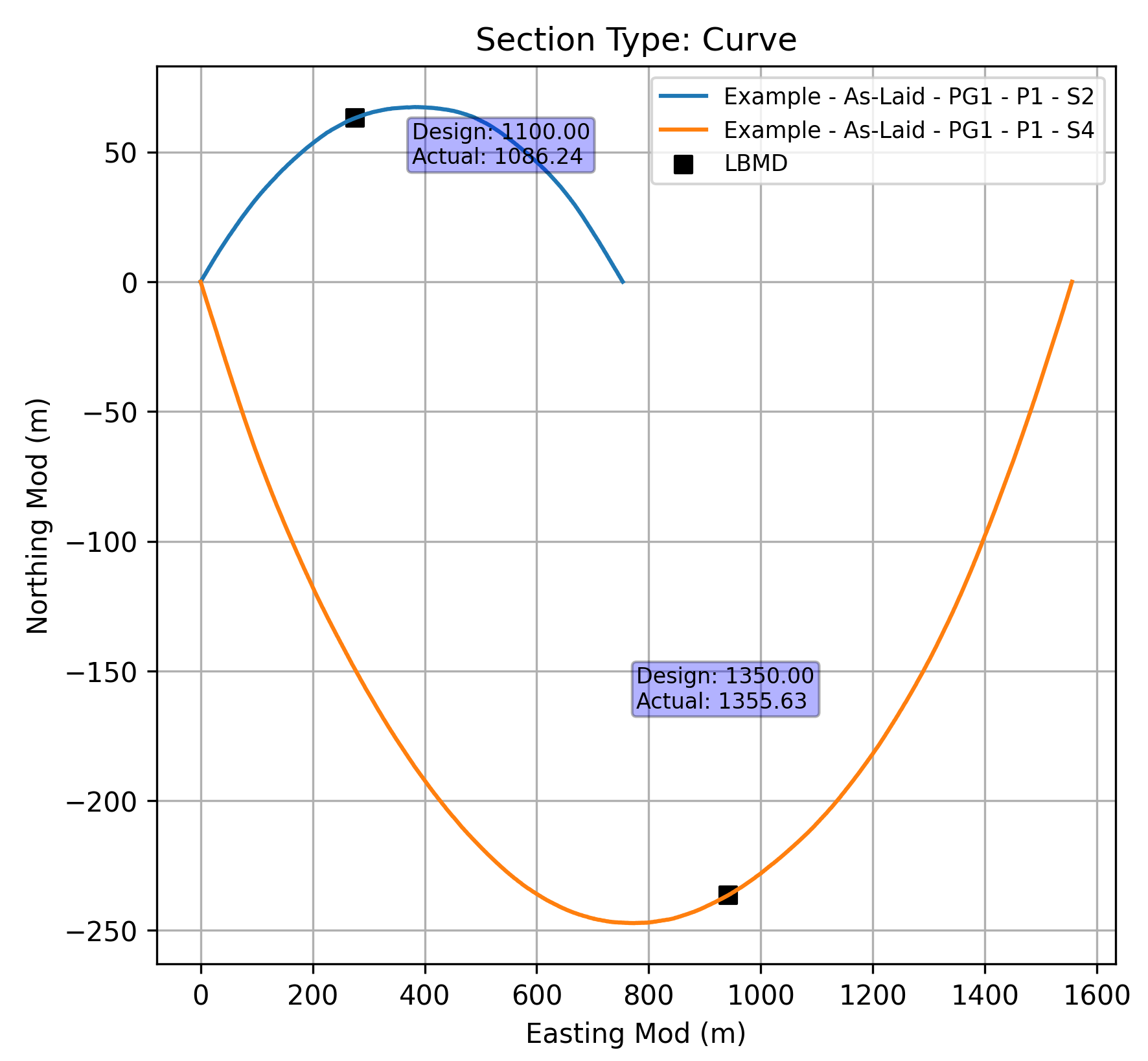
These figures present a graphical format of the information contained in the previous table, providing a visual summary of the post-processed survey data after OOS.
Variable Name |
Description |
|---|---|
Development |
Development for the pipeline. |
Survey Type |
Type of the survey. Note: The survey type can be As-Laid, As-Built, or OPxxxx. - As-Laid: Survey performed after installation. - As-Built: Survey performed after hydrotest. - OPxxxx: Operational survey; xxxx denotes the year (e.g., OP2023). |
Pipeline Group |
Group identifier for the pipeline. |
Pipeline |
Pipeline name or ID. |
Pipeline Group Section - Type |
Type of pipeline group section (i.e., Straight or Curve). Note: Indicates the geometric nature of the pipeline route at the KP. |
Pipeline Group Section No |
Integer identifier for the section of the pipeline at the given KP, starting from 1. Segments comprise straight and curve routing sections, and after removing 200m on either side of ILTs, LBMDs and PWMDs. |
Pipeline Group Section - KP Mod |
Kilometer Point along the pipeline group after splitting into sections and after removing 200m on either side of ILTs, LBMDs and PWMDs. Format: Decimal number (km), e.g. 12.145 Note: Used for analysis excluding influence zones of features. |
Pipeline Group Section - Easting Mod |
Easting coordinate after splitting, removing 200m on either side of ILTs, LBMDs, and PWMDs, and applying translation and rotation. Start of each section at origin (0,0), aligned horizontally. Format: Decimal number (m), e.g. 10101.5 Note: Referenced to pipeline route projection. |
Pipeline Group Section - Northing Mod |
Northing coordinate after splitting, removing 200m on either side of ILTs, LBMDs, and PWMDs, and applying translation and rotation. Start of each section at origin (0,0), aligned horizontally. Format: Decimal number (m), e.g. 3.5 Note: Referenced to pipeline route projection. |
Actual Route Curve Radius |
Actual, surveyed radius of curvature of the pipeline route curve (m). Format: Decimal number (m), e.g. 500.0 Note: Radius fitted by least squares method; applies only to curve sections. |
Route Curve Radius |
Design radius of curvature for curved sections (m). |
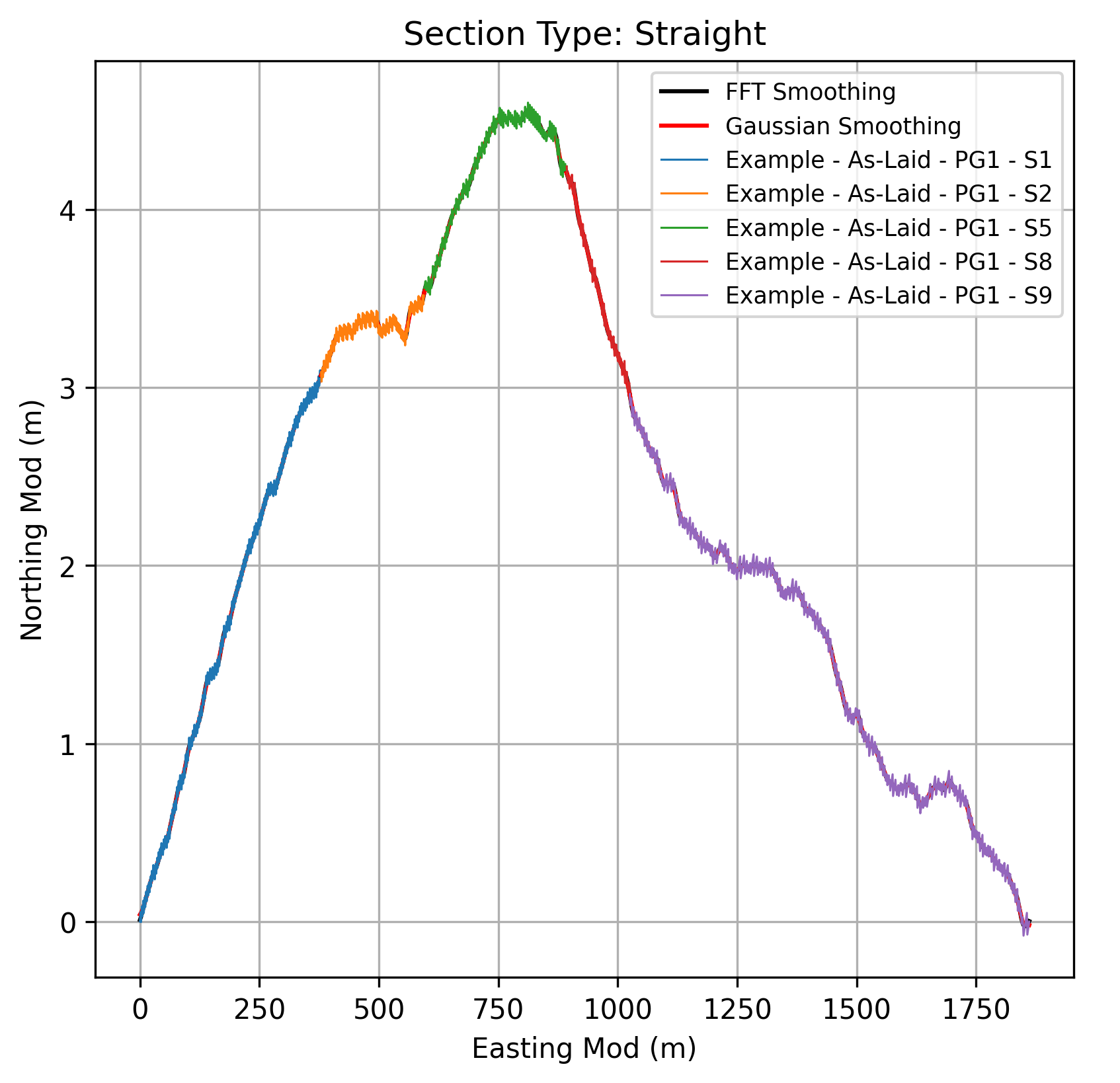
This figure presents a graphical format of the information contained in the previous table, providing a visual summary of the post-processed survey data after OOS.